practice
COCKTAIL RECIPES
frontend
A React + TypeScript practice project for browsing cocktail recipes via TheCocktailDB API, saving favorites, and generating original drink recipes with AI.
2026 - FULL-STACK DEVELOPER
⊹A React + TypeScript practice project for browsing cocktail recipes via TheCocktailDB API, saving favorites, and generating original drink recipes with AI.
PORTFOLIO WEB
⊹origin
https://cocktail-recipes.4hmartin.com/
section
Home
category
practice
development type
frontend
PORTFOLIO WEB
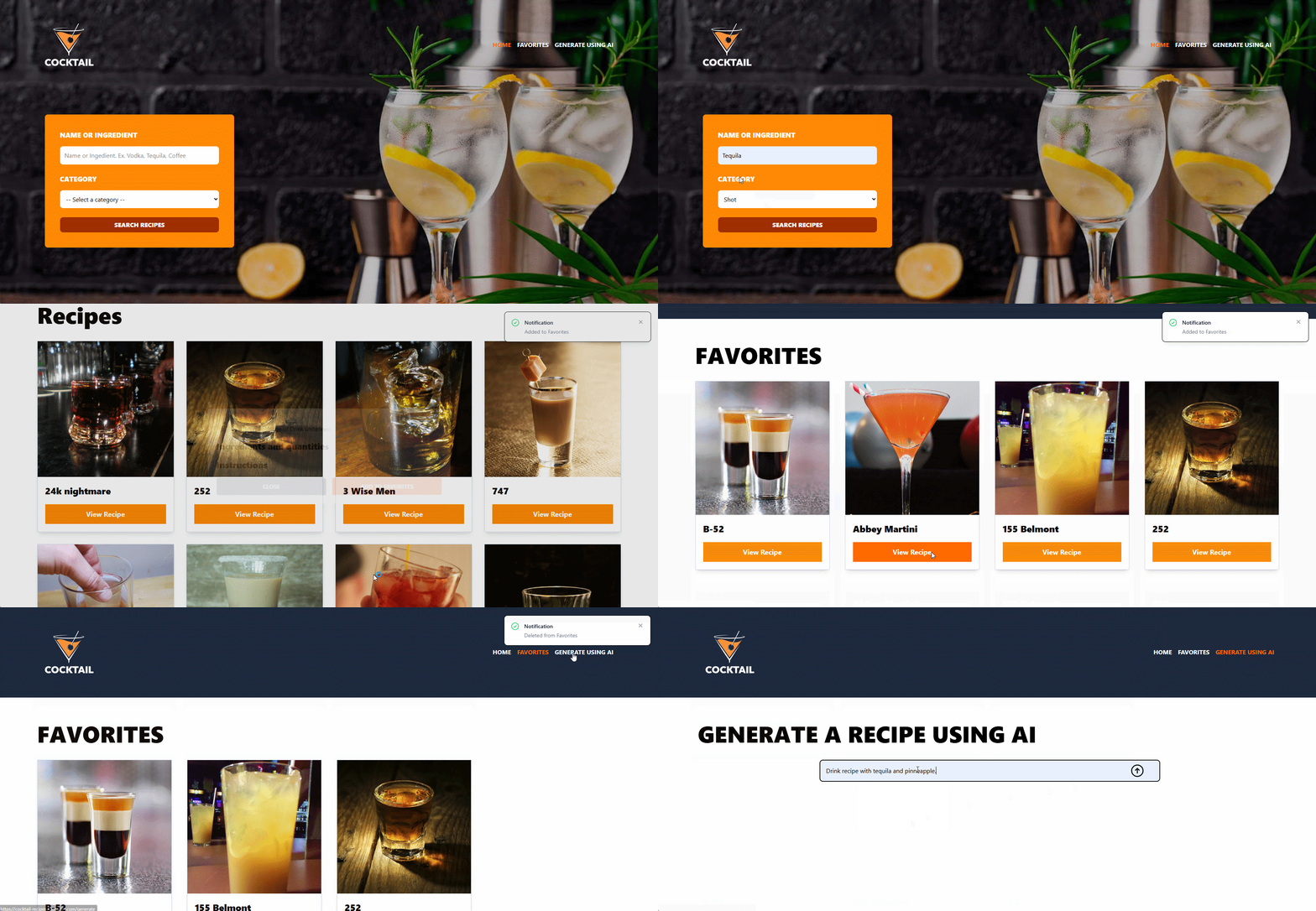
⊹A full-featured React application for discovering, generating, and saving cocktail recipes, built as a practice project to demonstrate modern frontend architecture patterns.
Filter cocktails by category and ingredient/name using TheCocktailDB public API.
View ingredients, measures, and instructions for a selected drink.
Add/remove drinks from a favorites list, persisted to localStorage.
Describe a drink in natural language and get a streamed, markdown-formatted recipe from an LLM via OpenRouter.
Lightweight feedback for validation errors and favorite actions.
1
2src/
3├── components/          # Reusable UI components
4│   ├── DrinkCard.tsx
5│   ├── Header.tsx        # Nav + home search form
6│   ├── Modal.tsx          # Recipe detail modal (Headless UI Dialog)
7│   └── Notification.tsx   # Toast notification
8├── layouts/
9│   └── Layout.tsx         # App shell: Header, <Outlet/>, Modal, Notification
10├── views/                # Route-level pages
11│   ├── Index.tsx           # Search results grid
12│   ├── Favorites.tsx        # Saved favorites grid
13│   └── GenerateAI.tsx        # AI recipe generator
14├── stores/               # Zustand slices, combined in useAppStore.ts
15│   ├── useAppStore.ts       # Combines all slices with devtools middleware
16│   ├── recipeSlice.ts        # Categories, search results, selected recipe, modal state
17│   ├── favoritesSlice.ts      # Favorites list + localStorage persistence
18│   ├── notificationSlice.ts    # Toast state
19│   └── aiSlice.ts               # AI generation state (streaming)
20├── services/             # External API calls
21│   ├── RecipeService.ts     # TheCocktailDB requests + Zod parsing
22│   └── AIService.ts          # OpenRouter streamText call
23├── lib/
24│   ├── axios.ts             # Axios instance (TheCocktailDB base URL)
25│   └── ai.ts                 # OpenRouter provider instance
26├── utils/
27│   └── recipes-schema.ts    # Zod schemas for all API responses
28├── types/
29│   └── index.ts              # Types inferred from Zod schemas
30├── router.tsx             # BrowserRouter + lazy-loaded routes
31├── main.tsx                # App entry point
32└── index.css # Tailwind import + custom keyframesThe app uses Zustand's slice pattern: each domain of state lives in its own StateCreator, and all slices are combined into a single store in src/stores/useAppStore.ts, wrapped with the devtools middleware for Redux DevTools support.
◇ recipeSlice - categories, search results, selected recipe, modal visibility.
◇ favoritesSlice - favorites array; reads/writes localStorage under the favorites key; depends on notificationSlice for toast feedback (cross-slice access via get/set/api functions).
◇ notificationSlice - transient toast state with an auto-hide timeout.
◇ aiSlice - holds the streamed AI response string and an isGenerating flag.
1// src/stores/useAppStore.ts
2import {create} from "zustand";
3import {devtools} from "zustand/middleware";
4import {type RecipesSliceTypes, createRecipeSlice} from "./recipeSlice.ts";
5import {type FavoritesSliceType, createFavoritesSlice} from "./favoritesSlice.ts";
6import {type NotificationSliceType, createNotificationSlice} from "./notificationSlice.ts";
7import {type AISlice, createAISlice} from "./aiSlice.ts";
8
9/**
10 * @description Multiple stores using Slice Pattern.
11 * '...a' contains a copy of the default functions to manipulate the state 'set(), get(), api()'.
12 */
13export const useAppStore = create<RecipesSliceTypes & FavoritesSliceType & NotificationSliceType & AISlice>()(
14    devtools((...a) => ({
15        ...createRecipeSlice(...a),
16        ...createFavoritesSlice(...a),
17        ...createNotificationSlice(...a),
18        ...createAISlice(...a),
19    }))
20);Categories, search results, selected recipe, modal visibility.
1// src/stores/recipeSlice.ts
2import type { StateCreator } from "zustand"
3import {getCategories, getRecipeById, getRecipes} from "../services/RecipeService.ts";
4import type {Categories, Drink, Drinks, SearchFilters, Recipe} from "../types";
5
6"export type RecipesSliceTypes = {
7    categories: Categories
8    drinks: Drinks
9    selectedRecipe: Recipe
10    modal: boolean
11
12    fetchCategories: () => Promise<void>
13    searchRecipes: (searchFilters: SearchFilters) => Promise<boolean>
14    selectRecipe: (id: Drink['idDrink']) => Promise<void>
15    closeModal: () => void
16}
17
18export const createRecipeSlice: StateCreator<RecipesSliceTypes> = (set) => ({
19    categories: {
20        drinks: []
21    },
22    drinks: {
23      drinks: []
24    },
25    selectedRecipe: {} as Recipe,
26    modal: false,
27    fetchCategories: async () => {
28        const categories = await getCategories();
29        set({
30            categories: categories,
31        })
32    },
33    searchRecipes: async (searchFilters) => {
34        let success = false;
35        const drinks = await getRecipes(searchFilters);
36        set({
37            drinks: drinks
38        })
39        if(drinks !== undefined) success = true;
40        return success
41    },
42    selectRecipe: async (id) => {
43        const selectedRecipe = await getRecipeById(id);
44        set({
45            selectedRecipe: selectedRecipe,
46            modal: true
47        })
48    },
49    closeModal: () => set({
50        modal: false,
51        selectedRecipe: {} as Recipe,
52    })
53})All responses from TheCocktailDB are parsed through Zod schemas (src/utils/recipes-schema.ts) via safeParse, and the corresponding TypeScript types are inferred from those schemas (src/types/index.ts) rather than hand-written — schema and type stay in sync by construction.
1// src/utils/recipes-schema.ts
2import {z} from 'zod'
3
4export const CategoriesAPIResponseSchema = z.object({
5    drinks: z.array(
6        z.object({
7            strCategory: z.string()
8        })
9    )
10})
11
12export const SearchFiltersSchema = z.object({
13    ingredient: z.string(),
14    category: z.string()
15})
16
17export const DrinkAPIResponse = z.object({
18    idDrink: z.string(),
19    strDrink: z.string(),
20    strDrinkThumb: z.string(),
21})
22export const DrinksApiResponseSchema = z.object({
23    drinks: z.array(DrinkAPIResponse),
24})
25
26...src/views/GenerateAI.tsx submits a free-text prompt (e.g. 'A drink made with vodka and mango') to generateRecipe in aiSlice, which calls AIService.generateRecipe:
The response is consumed as an async text stream and appended to aiSlice.recipe chunk by chunk, then rendered with react-markdown + remark-gfm (GitHub-flavored markdown: tables, strikethrough, task lists, etc.).
Model note: Uses a free-tier model from OpenRouter (minimax/minimax-m2.7:free).
1// src/services/AIService.ts
2import { streamText } from "ai";
3import { openRouter } from "../lib/ai";
4
5// List of available free models: https://openrouter.ai/models?variant=free&output_modalities=text&order=latency-low-to-high
6// AI SDK VERCEL - System Prompts: https://ai-sdk.dev/docs/foundations/prompts#system-prompts
7// AI SDK VERCEL - Temperature settings: https://ai-sdk.dev/docs/ai-sdk-core/prompt-engineering#temperature-settings
8
9export default {
10    async generateRecipe(prompt: string){
11        const result = streamText({
12            model: openRouter('minimax/minimax-m2.7:free'),
13            prompt,
14            instructions: 'You are a professional bartender with over 50 years experience...',
15            temperature: 0
16        })
17
18        return result.textStream
19    }
20}1// src/types/index.ts
2import {
3 CategoriesAPIResponseSchema,
4 SearchFiltersSchema,
5 DrinksApiResponseSchema,
6 DrinkAPIResponse,
7 RecipeAPIResponseSchema
8} from "../utils/recipes-schema.ts";
9import {z} from "zod";
10
11export type Categories = z.infer<typeof CategoriesAPIResponseSchema>;
12export type SearchFilters = z.infer<typeof SearchFiltersSchema>;
13export type Drinks = z.infer<typeof DrinksApiResponseSchema>;
14export type Drink = z.infer<typeof DrinkAPIResponse>;
15export type Recipe = z.infer<typeof RecipeAPIResponseSchema>;


