practice
TIPS CONSUMPTION CALCULATOR APP
frontend
This project is a simple web application built with React.js - Simulator to calculate the consumption and tips of a restaurant.
2026 - FULL-STACK DEVELOPER
⊹This project is a simple web application built with React.js - Simulator to calculate the consumption and tips of a restaurant.
PORTFOLIO WEB
⊹origin
https://tips-consumption-calculator.4hmartin.com/
section
Home
category
practice
development type
frontend
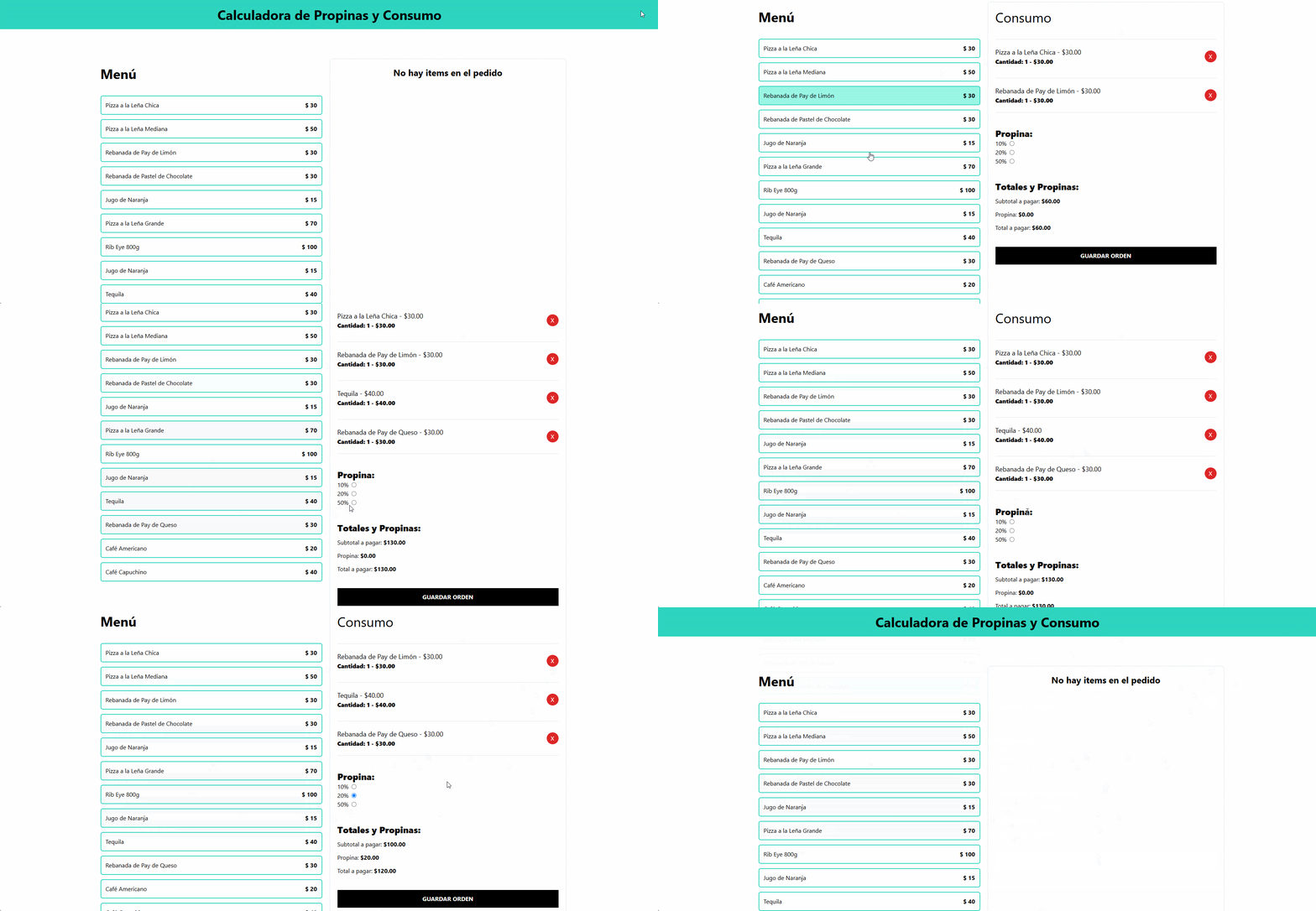
PORTFOLIO WEB
⊹Practical migration from a custom hook (useCart.ts) to the useReducer hook to manage complex state logic.
Type-safe handling of form events and actions using TypeScript.
Application of useMemo to optimize performance in real-time calculations.
The project in its first version was developed using custom hook and to deepen the practice of new ways of handling the state, all the logic is migrated to the use of useReducer.
Items: List of menu items extracted from file with array of typed objects. Click on items: Allows you to add the item to the order.
Click on items: Allows you to add the item to the order.
1import { MenuItem } from "../types"
2import { Dispatch } from "react"
3import { OrderActions } from "../reducers/order-reducer"
4
5type MenuItemProps = {
6    item: MenuItem
7    dispatch: Dispatch<OrderActions>
8}
9
10export const Menuitem = ({item, dispatch} : MenuItemProps) => {
11  return (
12    <button
13        className="border-2 border-teal-400 hover:bg-teal-200 w-full p-3 flex justify-between rounded-md"
14        onClick={() => dispatch({ type: 'add-item', payload: { item } })}
15    >
16        <p>{item.name}</p>
17        <p className="font-bold">$ {item.price}</p>
18    </button>
19  )
20}
21Selected Items: Displays the selected menu items, where users can view the unit price, the total cost based on the quantity selected, and also remove individual items.
Tip Selection: A form with three options to select the tip percentage based on the subtotal amount.
Total: Calculates the final amount to pay by adding the selected tip to the subtotal.
'Place Order' Button: Simulates sending the order, resetting the order summary section afterward.
1// App.tsx
2      ...
3      <div className='border border-dashed border-slate-300 p-5 rounded-lg space-y-10'>
4          {state.order.length ? (
5            <>
6              <OrderContents
7                order={state.order}
8                dispatch={dispatch}
9              />
10
11              <TipPercentageForm
12                dispatch={dispatch}
13                tip={state.tip}
14              />
15
16              <OrderTotals
17                order={state.order}
18                tip={state.tip}
19                dispatch={dispatch}
20              />
21            </>
22          ): (
23            <p className='text-center text-2xl font-bold'>No hay items en el pedido</p>
24          )}
25        </div>
26 ...Since this project does not implement global state management, the reducer is imported into App.tsx and passed down to child components via props. The useReducer hook initializes and provides both state and dispatch functions.
Example:
1export type OrderActions =
2    { type: 'add-item', payload: { item: MenuItem } } |
3    { type: 'remove-item', payload: { id: MenuItem['id'] } } |
4    { type: 'place-order' } |
5    { type: 'add-tip', payload: { value: number } }
6
7    ...
8
9    export const orderReducer = (
10        state: OrderState,
11        action: OrderActions
12    ) => {
13
14    {/** Añadir un item al pedido, comprobando si ya existe en el pedido y aumentando su cantidad si es así */}
15    if (action.type === 'add-item') {
16
17        /** Evitar duplicados al añadir el mismo item incrementando su cantidad */
18        const itemExists = state.order.find(orderItem => orderItem.id === action.payload.item.id)
19        let order : OrderItem[] = [];
20        if(itemExists){
21            order = state.order.map(orderItem =>
22                orderItem.id === action.payload.item.id ? {...orderItem, quantity: orderItem.quantity + 1} : orderItem
23            )
24
25        } else {
26            /**
27             * Casting de parámetro recibido MenuItem a OrderItem
28             * Creamos una nueva variable con la copia del objeto recibido por parámetro y le añadimos la propiedad 'quantity'
29             * para que el nuevo objeto 'newItem' pueda ser del type OrderItem
30             */
31            const newItem = {...action.payload.item, quantity: 1}
32            /**
33             * Spread operator para copiar los valores del state actual y añadimos el nuevo objeto
34             */
35            order = [...state.order, newItem]
36        }
37
38        return {
39            ...state,
40            order
41        }
42    }
43    {/* Evitar duplicados al eliminar un item, eliminando el item por su ID */}
44    if (action.type === 'remove-item') {
45 ...In this project, useMemo is used for efficiently calculate the total amount to pay.
Example file path: OrderTotals.tsx
Example:
1    const subtotalAmount = useMemo(() => order.reduce((subTotal, item) => subTotal + (item.price * item.quantity) , 0 ) ,[order])
2
3    const tipAmount = useMemo(() => {return subtotalAmount * tip}, [tip, order])
4
5    const totalAmount = useMemo(() => {return subtotalAmount + tipAmount}, [tip, order])
