practice
VETERINARY PATIENT FOLLOW-UP APP
frontend
Practical project in React, where the user enters their pet's details to add it to the list of patients, using a form managed by react-hook-form and global state management via zustand.
2026 - FULL-STACK DEVELOPER
⊹Practical project in React, where the user enters their pet's details to add it to the list of patients, using a form managed by react-hook-form and global state management via zustand.
PORTFOLIO WEB
⊹origin
https://veterinary-patient.4hmartin.com/
section
Home
category
practice
development type
frontend
PORTFOLIO WEB
⊹Practical project in React, where the user enters their pet's details to add it to the list of patients, using a form managed by react-hook-form and global state management via zustand.
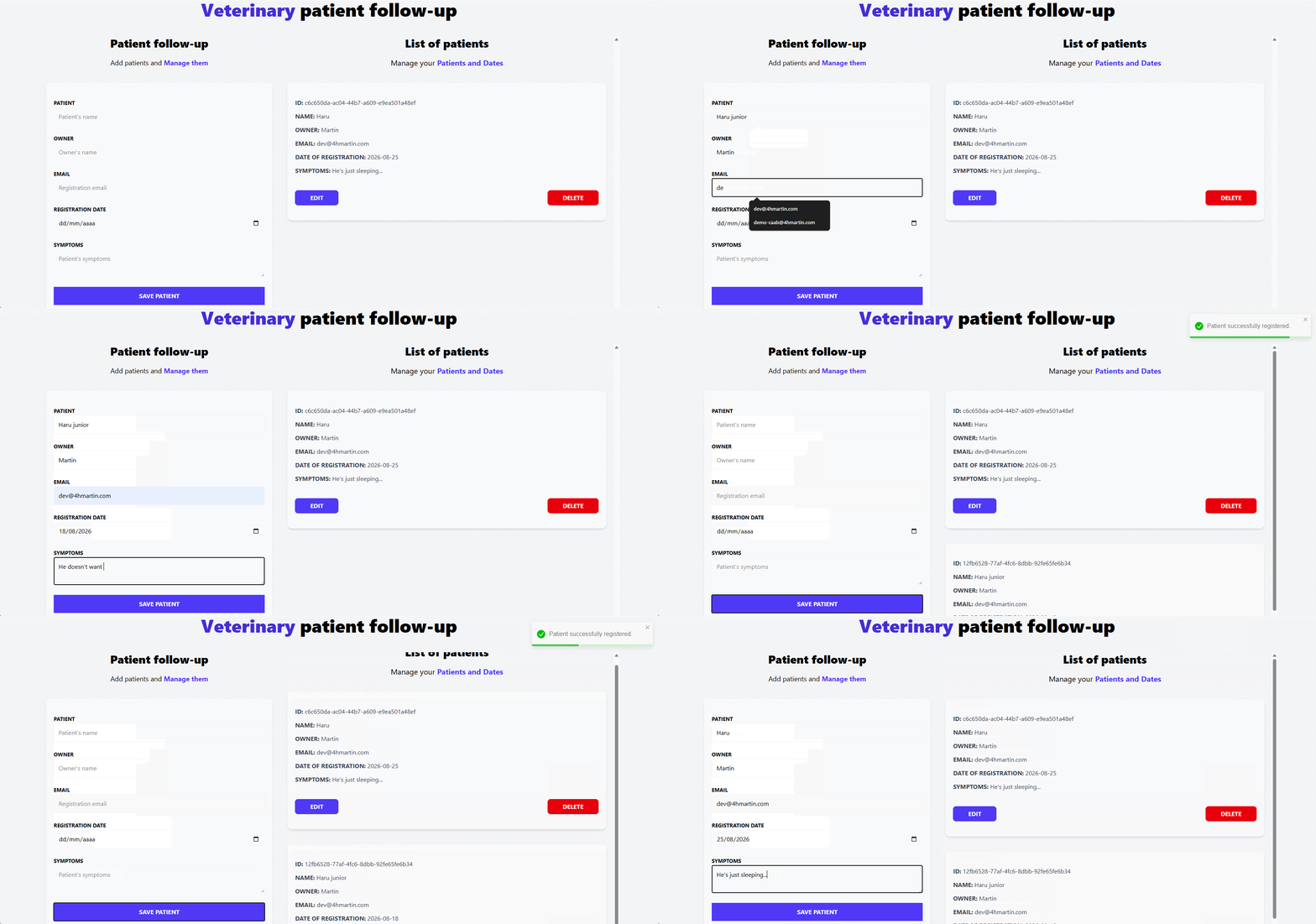
The application allows a veterinary clinic to keep a follow-up list of patients (pets), each linked to an owner (caretaker), a registration date, a contact email, and a description of symptoms.
Records can be created, edited, and deleted, and the list persists across browser sessions via localStorage.
Add a new pet to the list via a validated form (name, owner, email, registration date, symptoms).
All fields are required, and the email field is validated against a regex pattern, with inline error messages.
Load an existing record back into the form to update its details.
Remove a record from the list with a single click.
The patient list is persisted to localStorage (via Zustand's persist middleware) so data survives page reloads.
Success (register/update) and error (delete) actions trigger contextual toast messages.
A friendly message is shown when no patients have been registered yet.
Two-column layout (form / list) on medium+ screens, single column on mobile.
react-hook-form - Form state, validation, and submission handling in PatientForm.
zustand - Global state management for the patient list and the active (editing) patient ID.
zustand/middleware (persist) - Persists the Zustand store to localStorage under the key patient-storage.
react-toastify - Toast notifications for create, update, and delete actions.
uuid - Generates unique id values (uuidv4) for new patient records.
In PatientForm, watches activeId to pre-fill the form fields when a patient is selected for editing.
1...
2useEffect(() => {
3  if(activeId){
4      const activePatient = patients.filter(patient => patient.id === activeId)[0];
5      setValue('name', activePatient.name);
6      setValue('caretaker', activePatient.caretaker);
7      setValue('date', activePatient.date);
8      setValue('email', activePatient.email);
9      setValue('symptoms', activePatient.symptoms);
10  }
11}, [activeId]);
12...Manages form registration (register), validation errors (formState.errors), submission (handleSubmit), field updates (setValue), and reset (reset).
1...
2const {
3    register,
4    setValue,
5    handleSubmit,
6    formState: {errors},
7    reset
8} = useForm<DraftPatient>();
9...Exposes the global store's state (patients, activeId) and actions (addPatient, updatePatient, deletePatient, getPatientById) to any component that needs them.
1// store.ts
2import {create} from 'zustand'
3import type { DraftPatient, Patient } from './types'
4import { v4 as uuidv4 } from 'uuid'
5import { persist } from 'zustand/middleware'
6
7/** The state and its actions must be defined within the state type */
8type PatientState = {
9    patients: Patient[]
10    activeId: Patient['id']
11    addPatient: (data: DraftPatient) => void
12    deletePatient: (id: Patient['id']) => void
13    getPatientById: (id: Patient['id']) => void
14    updatePatient: (data: DraftPatient) => void
15}
16
17/**
18 * @description Converts type DraftPatient to Patient by adding an ID
19 */
20const createPatient = (patient: DraftPatient): Patient => {
21    return { ...patient, id: uuidv4() }
22}
23
24/**
25 * @description The callback of the create function can receive two functions as parameters: the 'set' function to add values
26 * to the state and the 'get' function to obtain values from the state.
27 * In order to visualise state data, the use of the usePatientStore must be instantiated.
28 */
29export const usePatientStore = create<PatientState>()(
30
31    persist( (set) => ({
32        patients: [],
33        activeId: '',
34
35        addPatient(data) {
36
37            const newPatient = createPatient(data)
38
39            /** Parameter state is a reserved keyword that refers to the state */
40            set((state) => ({
41                patients: [...state.patients, newPatient]
42            }))
43        },
44
45        deletePatient(id) {
46            set((state) => ({
47                patients: state.patients.filter( patient => patient.id !== id)
48            }))
49        },
50
51        getPatientById(id) {
52            set(() => ({
53                activeId: id
54            }))
55        },
56
57        updatePatient(data) {
58            set((state) => ({
59                patients: state.patients.map(patient => patient.id === state.activeId ? {
60                    id: state.activeId, ...data
61                } : patient),
62                activeId: ''
63            }))
64        }
65    }),{
66        name: 'patient-storage'
67    }
68))1src/
2├── components/
3│ ├── PatientForm.tsx # Form to add/edit a patient (react-hook-form)
4│ ├── PatientList.tsx # Renders the list of registered patients
5│ ├── PatientDetails.tsx # Single patient card with Edit/Delete actions
6│ ├── PatientDetailsItem.tsx # Label/value row used inside PatientDetails
7│ └── Error.tsx # Inline field-validation error message
8├── types/
9│ └── index.ts # Patient / DraftPatient type definitions
10├── store.ts # Zustand store (state + actions) with persist middleware
11├── App.tsx # Root layout (form + list + toast container)
12└── main.tsx # Application entry point1type Patient = {
2 id: string
3 name: string
4 caretaker: string
5 email: string
6 date: Date
7 symptoms: string
8}
9
10type DraftPatient = Omit<Patient, 'id'>


